What Happens to Your Stock on a Return or Cancellation
When an order is cancelled, the cancelled units go back into your Available stock automatically. A returned item moves into Return once you approve the return, and it goes back on sale only when you restock it. You restock it with a tick when you refund or reject the return, or later with a Restock button on the resolved card. A refund where the buyer keeps the item never restocks anything.
Applies to / Before you start
Available on: Lite, Pro and Scale. On Free, the Cancellations, returns and refunds page shows an upgrade prompt, and the Requests link in the sidebar shows a padlock. Stock movement on cancellations and returns happens on every plan. On Lite, Pro and Scale you answer returns, refunds and buyer-raised cancellations in Indexync, across all four marketplaces. On Free, stock still moves on its own, but you answer the request in the marketplace's seller portal.
When Does Your Stock Move?
Stock moves on its own in the cases below, and you decide the rest. A return moves stock only because a return case exists, so an order's status alone never puts units into Return.
If a return is already holding units in Return and the order is later cancelled, those units stay in Return while the return is open. They do not go back on sale by themselves.
You can see the Return count for each SKU in its history panel. See How Inventory Sync Works Across Marketplaces and See and Manage Stock for Every Marketplace in One Place.
Where You Answer a Return, Refund or Cancellation
Every return, refund and buyer-raised cancellation waiting on your decision collects on one page: Cancellations, returns and refunds.
- Get there from Requests in the sidebar. Requests carries a red count badge whenever something is owed.
- Four tiles at the top count your cases: Action required, Action required today, Decided by marketplace (last 7 days) and Resolved (last 7 days).
- Five tabs organise the queue: All, Action required, Return in progress, Pending buyer / marketplace action, and Resolved. Type filters narrow it further to cancellations, returns, refund only, ongoing negotiation or disputed.
- Search by order ID to jump straight to one case.
- A refund you made yourself (in your Shopify admin, or with Refund Buyer in Indexync) shows the label REFUNDED BY SELLER and the status Buyer refunded. It does not count in Decided by marketplace.
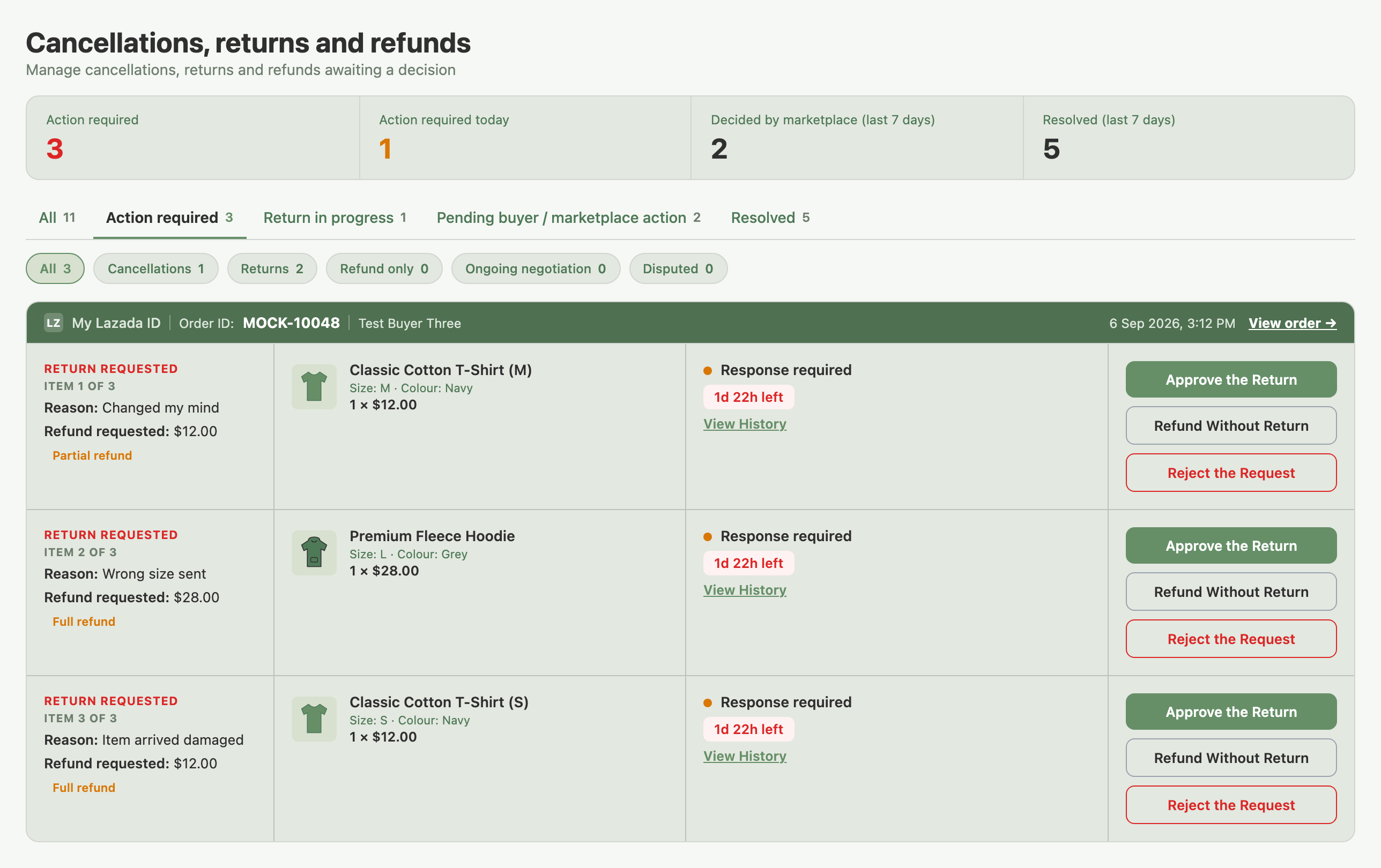
Example: a buyer changes their mind about one shirt in a four-item Lazada return. You answer that item alone from its card, and the other three items keep their own status and their own deadline.
Answering a Return and Restocking It
A return that needs the goods back has two decisions. First you approve the return, which tells the buyer to send the item. The Requests page then shows the case as approved while the buyer sends the parcel back. When the item reaches you, a second decision is required: confirm and refund, or reject. The restock tick belongs to that second decision.
The tick works like this:
- It appears only once the goods are back with you. You see it on both Issue Refund and Reject the Request, because rejecting refuses the money without sending the goods back. It never appears on your first decision, and never on a refund where the buyer keeps the item.
- The tick and the send button state the count, for example "Add 3 items back into stock" and Issue Refund and Restock 3.
- Whether it starts ticked depends on the marketplace. On Lazada it starts ticked when the buyer's reason is a wrong item, a change of mind or a mutual agreement. Every other Lazada reason starts unticked, and so do all TikTok and Shopee returns. You can change it either way.
- Shopify's Process & refund window is different. Its tick, Add these items back into stock, starts ticked. Its buttons read Refund $X and Restock N or Process with No Refund, Restock N. Untick it if the item cannot be sold again.

Once you confirm, the new quantity pushes to every connected marketplace for that SKU, the same way any other stock change does.
Example: a TikTok buyer returns three of the same phone case. You approve the return, and the three units show in Return. When the parcel arrives you issue the refund with the tick on, and all three units land back in Available together.
Example: a Shopee buyer ordered 2 mugs, receives a refund for 1 and keeps it. Nothing moves, and the case has no Restock button.
Restocking a Return Later
If you refunded or rejected without the tick, the units stay in Return and never go on sale by themselves. When you decide they are sellable after all, open the case on the Resolved tab and press Restock N Items (it reads Restock 1 Item for a single unit).

- The card shows what was restocked. A line such as "2 added back into stock" appears once units have gone back on sale. The Restock button appears while units are still in Return. A multi-item card shows both once, on its first row.
- There is no button while the parcel is in transit. It also disappears after you use it. Team members who cannot decide on requests see it disabled.
- If your trial has ended, the units are restocked in Indexync but the new quantity is not sent to your marketplaces. The message tells you to upgrade to sync inventory again.
- If a SKU has no stock record, the rest still restock and the message names the SKU so you can adjust it on the Inventory page.
Example: a shirt comes back stained, so you issue the refund with the tick off and the unit stays in Return. A week later you decide it is fine to sell. You open the Resolved card and press Restock 1 Item, and the unit goes back into Available.
Refunding a Shopify Order Without a Return
Sometimes a Shopify buyer asks for their money back outside the marketplace, so no request ever reaches your Requests page. You answer from the order itself: open the order on the Orders page and choose Refund Buyer. The option is hidden for Shopify orders that are already cancelled or refunded.
The amount starts at the order total and you can edit it down. The window has two ticks:
- Restock the items (removes them from the order) starts unticked. Tick it if the goods are going back on your shelf, and the items go back into Available in Indexync and in Shopify together. Leave it off if the buyer keeps them.
- Email the customer about the refund starts ticked.
Three things are worth knowing before you use it:
- Restocking covers the whole order. Shopify only accepts a restock on a full refund. If you edit the amount down and leave the restock tick on, the refund is refused with a message telling you to refund in full or clear the tick.
- Stores with more than one location. If the refund restocks at a location other than the one Indexync syncs with, Indexync tells you the stock was not put back. Adjust it on the Inventory page.
- It won't double up. If a return on that same order already put the stock back, ticking the box here doesn't add it a second time, and Indexync tells you so.
Example: a buyer messages you on WhatsApp the day after ordering, before you have shipped. You agree to cancel and refund. You open the order, choose Refund Buyer, leave the amount at the total, and tick the restock box. Shopify pays the buyer back and both your Indexync stock and your Shopify stock go up by the two units.
How Answering a Return Differs by Marketplace
On Lazada, TikTok and Shopee the answer buttons read Approve the Return, Refund Without Return and Reject the Request. Sending a partial refund offer uses a Send Offer button.
Example: a Shopify seller approves a return, then the buyer changes their mind and keeps the item. Click Cancel the Approval. The order goes back to fulfilled and no stock moves.
Cancelling an Order
A cancellation can come from either side. You can cancel from Indexync, and a buyer can raise a cancellation for you to answer, which lands in the same Requests queue as returns.
To cancel from your side: open the order's Actions menu and click Cancel Order. The option is available only before the order ships. If no Cancel button appears, check the order's current state in the marketplace seller portal.
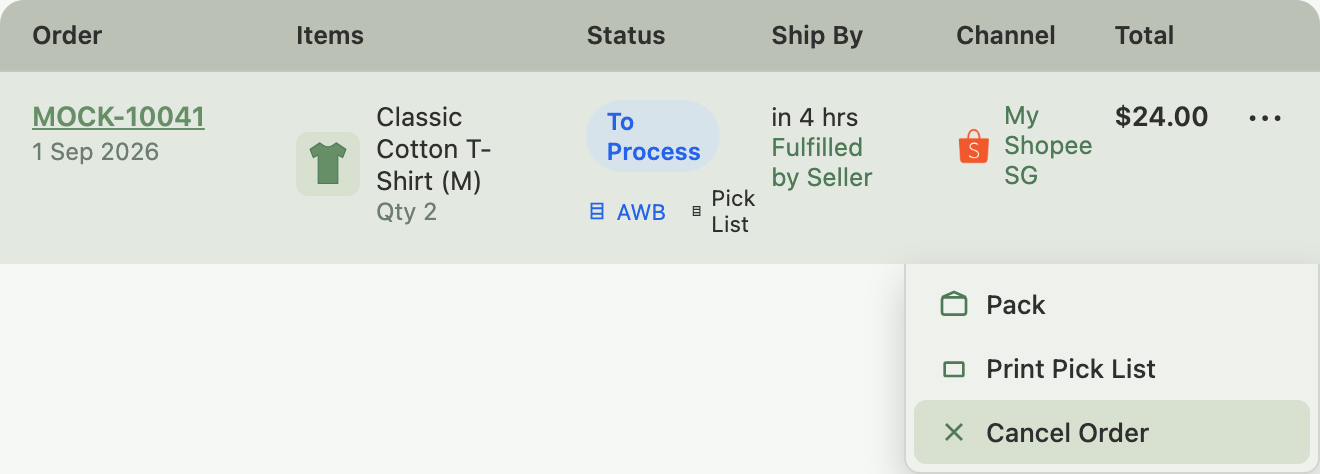
In the Cancel Order window:
- Pick a reason. Cancellation Reason is required every time.
- Choose which items to cancel (Lazada and Shopee). Select SKUs to Cancel lets you tick every item for a full cancellation, or only some. The ticked items cancel and the rest stay in the order. TikTok and Shopify cancel the whole order, so the window has no item ticks.
- Click Cancel Order to send it.
- On Lazada, a stock or pricing reason can show Lazada's own warning about your SKU's stock and about frequent cancellations affecting your ability to sell. Read it before you confirm.
Example: a buyer ordered 3 items on Shopee. Before you ship, one item turns out to be out of stock. Open the order, click Cancel Order, tick only that item, choose Out of Stock, and submit. Only that one unit goes back into Available, and the other 2 items continue to fulfilment.
Troubleshooting
No Cancel button on an order I expected to cancel. The marketplace has moved that order past its cancellable window. Check the order's state in the marketplace seller portal; if it doesn't allow cancellation there either, it's too far along to cancel from either side.
Stock hasn't updated yet after a cancellation. Give it a moment, since the restore depends on marketplace confirmation. If it's still missing after a few minutes, check the Inventory page and confirm the cancellation went through on the marketplace side.
A returned item isn't back in my sellable stock. This is expected until you restock it. Work through these:
- The restock tick was off when you issued the refund or rejection. Open the case on the Resolved tab and press Restock N Items.
- The parcel is still in transit. The button appears once the goods are back with you.
- The return was already settled before this update. Those returns were not restocked, and they offer no Restock button. Adjust the stock on the Inventory page if the goods are sellable.
- The item has no matching product in Indexync. The rest of the return still restocks, and the message names that SKU so you can adjust it on the Inventory page.
- You used Refund Buyer on a Shopify order and left the restock tick off. That tick starts unticked. Adjust the stock on the Inventory page if the goods came back.
There's no Restock button on a case. The button appears only on the Resolved tab. It is also absent while the parcel is in transit and once the stock has been restocked. You will not see it when nothing is left in Return, on a refund where the buyer kept the item, or on a return settled before this update.
A return or cancellation's status in Indexync looks stale. See Order Sync & Updates for how and when Indexync catches up.
FAQ
Does my stock come back automatically when an order is cancelled?
Yes. Cancelled units go back into Available automatically, whether the cancellation is full or partial and whether the order had shipped or not.
Does my stock come back automatically when an order is returned?
No, and that's deliberate. A return moves the units into Return, and they only go back on sale when you restock them, because a returned item isn't always fit to sell again.
When does a returned item show up in Return?
When you approve the return and the goods are heading back to you, not when the parcel arrives. If the return is rejected or cancelled before any goods come back, the units leave Return and the sale stands.
I refunded a return but didn't tick the box. How do I put the stock back?
Open the case on the Resolved tab of the Cancellations, returns and refunds page and press Restock N Items. The units move from Return to Available and the new quantity syncs to your marketplaces.
I already refunded a return in the marketplace's own app. Why is it still in Indexync?
Indexync picks up your decision on its own and moves the case to the Resolved tab, though this can take a little while. Refunding in the marketplace's app does not put the stock back, so the units stay in Return until you press Restock N Items on the Resolved card. On Shopify, units you restock in your Shopify admin at the location Indexync syncs with go straight back into Available.
Does a refund where the buyer keeps the item put stock back?
No. The item never left the buyer, so nothing moves into Return and no Restock button appears.
A Shopify buyer asked for a refund outside the marketplace. Where do I do that?
On the Orders page. Open the order and choose Refund Buyer. Tick the restock box if the goods are going back on your shelf, and leave it off if the buyer is keeping them.
Can I cancel just one item in a multi-item order?
On Lazada and Shopee, yes: tick only the items you want in Select SKUs to Cancel, and the rest of the order continues to fulfilment. On TikTok and Shopify, the whole order cancels.
Related Articles
- Where Do All My Marketplace Orders Show Up?
- Troubleshooting Order Issues
- Order Sync & Updates
- How Inventory Sync Works Across Marketplaces
- See and Manage Stock for Every Marketplace in One Place
Need more help?
Use the Feedback form, message us on WhatsApp, or email hello@indexync.com.