What Happens to Orders Over Your Plan's Monthly Limit?
Each Indexync plan includes a monthly order limit. Once you reach it, new orders still arrive, marked Limit Exceeded. You can see them, but you cannot ship, cancel, or refund them. You unlock them by upgrading your plan or turning on Extra Orders. A new billing cycle resets your count for orders going forward, but it does not unlock orders already marked Limit Exceeded.
Applies to: All plans
Monthly order limits
The limit is per billing month, not per calendar month. Your counter resets on your billing date, which you can find on Billing (open your profile menu at the top right and choose Billing).
What happens when you hit the limit
- New orders still arrive. They appear in Manage Orders with a red Limit Exceeded status.
- You cannot work on them. Shipping, cancelling, refunding, and printing labels are all unavailable, and the order will not open.
- Your stock count in Indexync goes down right away, the same as any other order, so your numbers stay truthful. The updated count is not sent to your other marketplaces while the order stays over the limit.
- Earlier orders are unaffected. Everything counted before you hit the limit works as normal.
- Your listings stay live throughout, and customers can still buy from you.
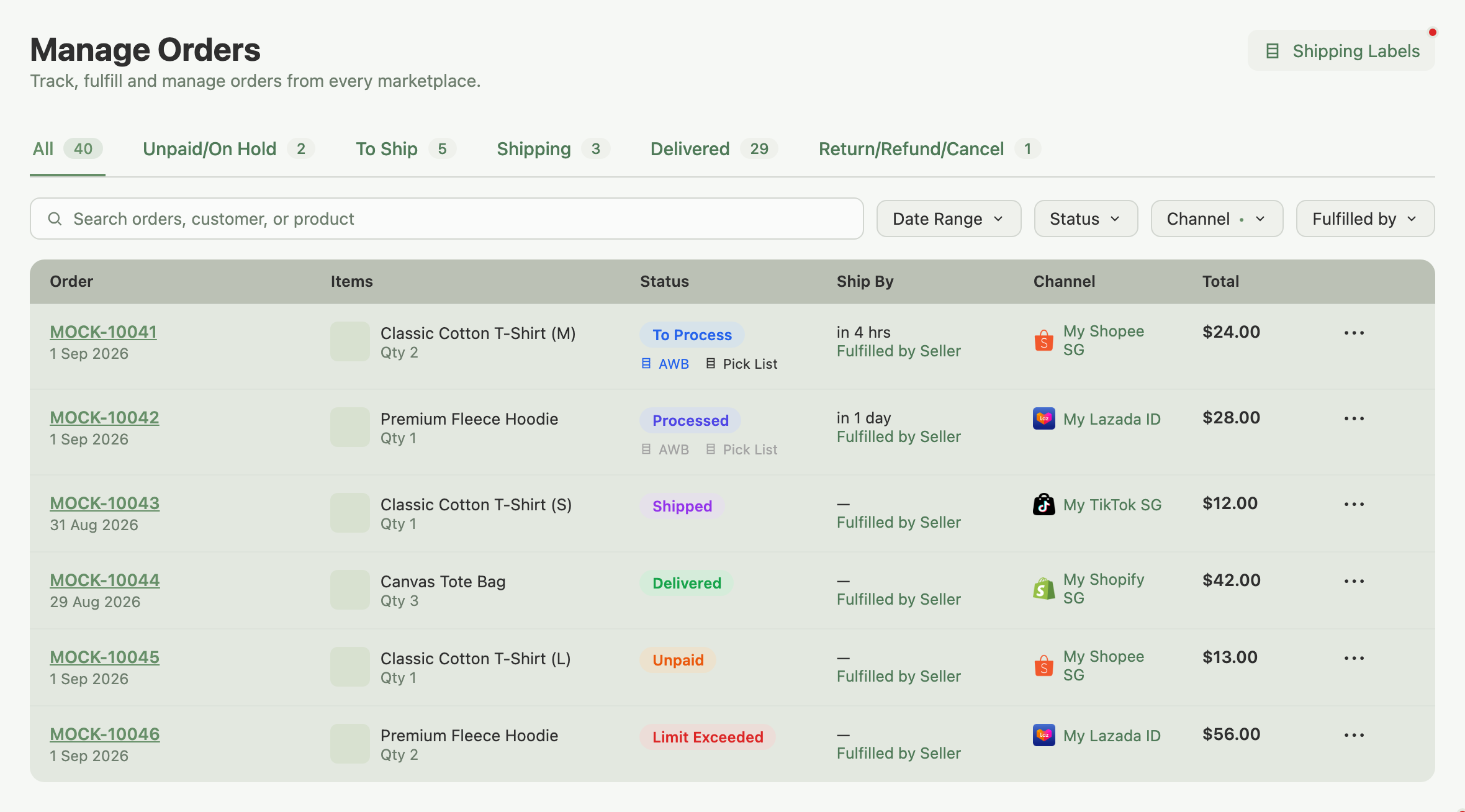
Example: you're on Lite (150 orders a month). On the 18th you hit 150. Orders arriving after that show up as Limit Exceeded and you cannot ship them. Waiting for your next billing date resets your count for new orders, but the orders from the 18th stay locked until you upgrade or turn on Extra Orders.
How to unlock them
You have two options. Both start automatically once you act, and both work through your locked orders oldest first.
Upgrade your plan
Upgrading unlocks your Limit Exceeded orders for you in the background, usually within a few minutes. You don't need to start anything.
- Your new limit still applies. Indexync unlocks the oldest orders first and stops once it reaches your new monthly limit. If more orders were locked than your new plan allows, the rest stay locked. They won't unlock later on their own, so move to a higher-limit plan or turn on Extra Orders if you still need them.
- Your marketplaces catch up automatically. The stock was already counted inside Indexync when each order arrived; unlocking sends the updated numbers out to your other marketplaces for the products involved. Nothing to correct by hand.
Turn on Extra Orders
Extra Orders lets you keep processing past your monthly limit instead of waiting to upgrade.
Extra Orders is a row in the Add-Ons section on Billing (open your profile menu at the top right and choose Billing), under the SKU Packs row.
- Available on Lite, Pro, and Scale. Not available on Free.
- Off unless you switch it on yourself.
- You're charged per extra order.
- Turning it on also unlocks any orders already marked Limit Exceeded, oldest first, the same way an upgrade does.
- Not available while your Shopify plan is on annual billing. If you approve a switch to annual billing on Shopify, Extra Orders turns off at that approval and stays off. To use it again, switch to monthly billing.
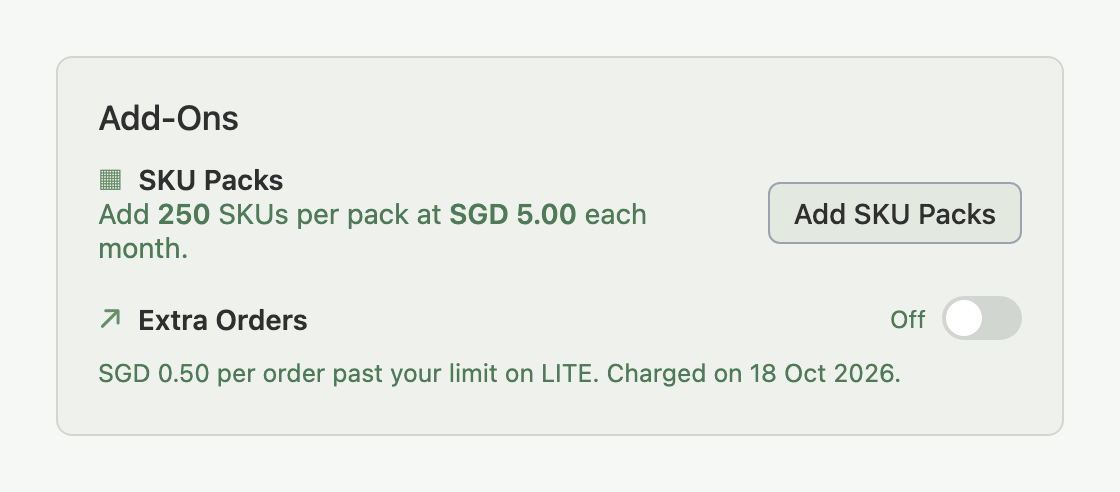
The SKU Packs row above it adds room for SKUs, not orders. See How Do I Get More SKUs Without Upgrading My Plan?.
With Extra Orders on, new orders past your limit keep arriving and syncing normally instead of parking. With it off, they wait at Limit Exceeded until you upgrade, turn it on, or your next billing date arrives, whichever comes first, though only the first two actually unlock the orders already stuck.
Where to check your current usage
Open your profile menu at the top right, choose Billing, and find the Plan Usage Limits card. It shows your monthly orders bar alongside your next reset date.
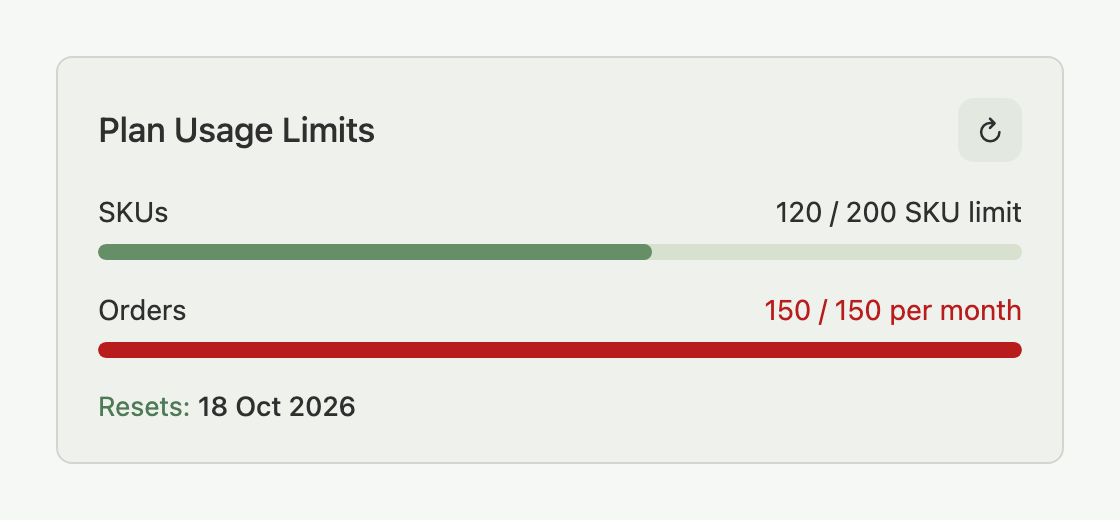
- Green: comfortable room left.
- Amber: from 75% of your limit.
- Red: only once you actually reach 100%.
The bar updates automatically as orders come in. For an on-demand refresh, click the refresh icon at the top right of the card; if you use it again too soon it briefly disables itself, and hovering shows when it's ready again. See Viewing and troubleshooting plan usage for the full breakdown of what counts toward your usage and how to diagnose an unexpected number.
Orders parked at your limit are also what drives the "orders couldn't sync this cycle" line on your Dashboard alert banner: it's the same Limit Exceeded orders described here, shown from the dashboard's point of view.
FAQ
Does waiting for my next billing date unlock Limit Exceeded orders?
No. Your count resets so new orders can come in again, but orders already marked Limit Exceeded stay locked until you upgrade your plan or turn on Extra Orders.
Will upgrading unlock every Limit Exceeded order I have?
Only up to your new plan's monthly limit, oldest orders first. If you had more locked than your new limit allows, the rest stay locked; a higher plan or Extra Orders is what clears them.
Does unlocking an order take stock off my other marketplaces?
Yes. The stock was already counted as sold inside Indexync when the order arrived. Unlocking sends that updated number out to your other marketplaces for the products involved, so you do not need to correct anything by hand.
Is Extra Orders available on the Free plan?
No. Extra Orders is available on Lite, Pro, and Scale. On Free, upgrading is the only way to unlock Limit Exceeded orders or keep processing past your limit.
Why did Extra Orders turn off after I switched to annual billing on Shopify?
Extra Orders isn't available on annual Shopify billing, so it turns off when you approve the switch; moving back to monthly billing lets you turn it on again.
Related Articles
- Understanding orders and order details
- Order sync and updates
- How to upgrade your plan
- Viewing and troubleshooting plan usage
- How Do I Get More SKUs Without Upgrading My Plan?
- Your Dashboard
Need More Help?
Visit our Feedback form, WhatsApp us, or email hello@indexync.com.