How to Upgrade Your Plan
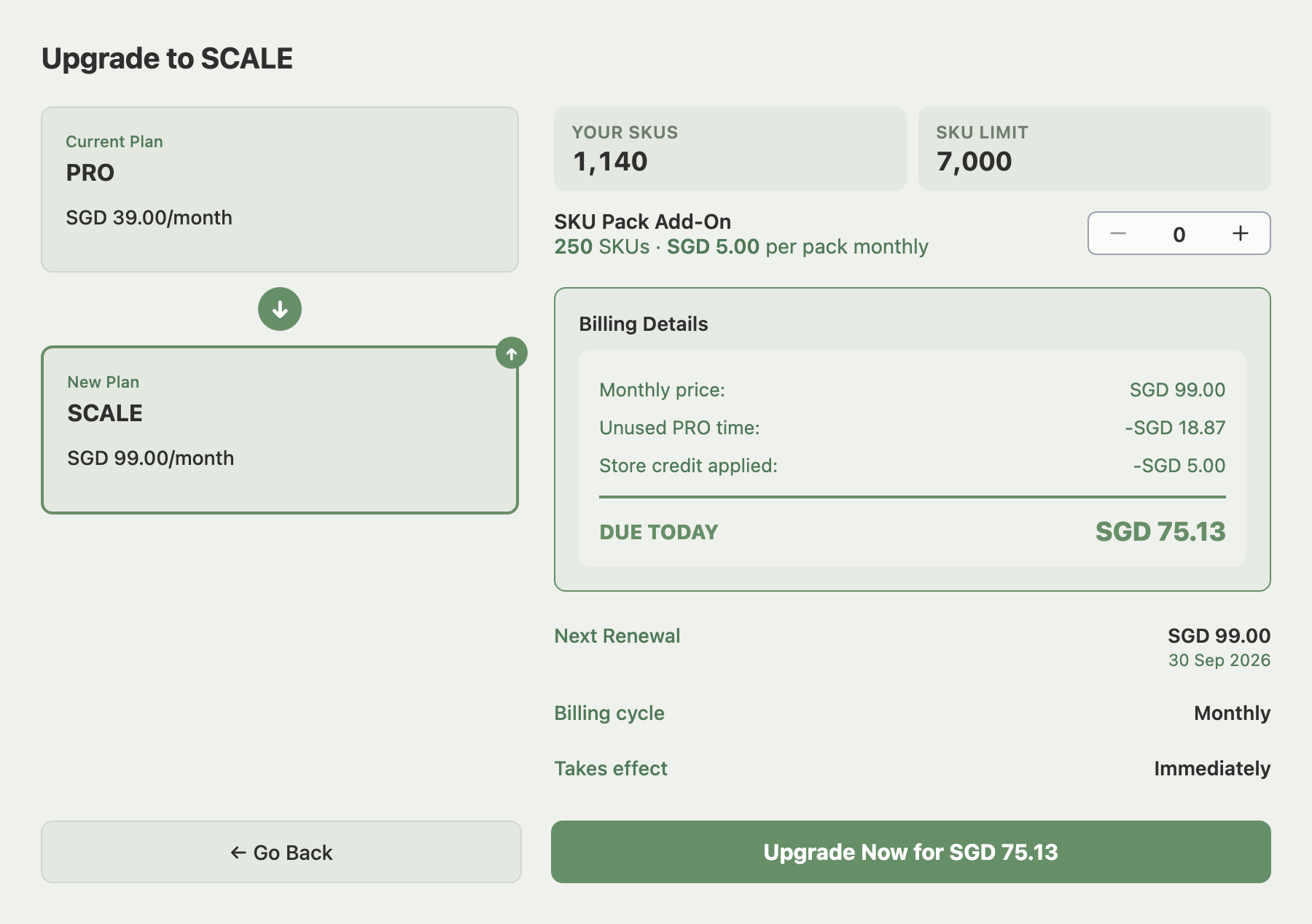
To upgrade your Indexync plan, open Billing from your profile menu, click Manage Subscription, choose the higher plan and confirm. Your higher SKU and order limits start the moment you confirm. Before you commit, the confirmation screen shows the new plan at its full price. It takes off the time left on your old plan and any store credit. Then it shows what is due today and your next billing date.
Applies to: Indexync users on FREE, LITE or PRO.
How to Upgrade Your Plan
- Open Billing from your profile menu at the top of the screen, or from the sidebar menu on your phone.

- Click Manage Subscription on the Current Plan card. To change your billing cycle at the same time, use the Monthly and Annual toggle at the top right.

- Click the plan you want. A panel on the right shows what changes, including your new limits.
- If your promo or referral code applies, click Add a code and enter it.
- Click Upgrade.

- On the confirmation screen, check the amount and the next billing date. If your SKUs need more room than the new plan gives, set the SKU Pack counter (see the next section).
- Click Upgrade Now for followed by the amount, for example Upgrade Now for SGD 75.13. A Plan Upgraded message tells you it worked.
What You Pay When You Upgrade
The confirmation screen, your invoice, your receipt and the payment email all list the new plan at its full price. Below it come Unused PRO time (named for your old plan, shown as a subtraction), the unused days of any SKU pack you remove, any store credit you have, and Due Today (the invoice and receipt call it Total). A separate Remaining credit row appears only when your credit includes awarded free months, or when part of it goes to store credit on a switch from monthly to annual.
Your billing cycle starts again from the day you upgrade, so that day becomes your billing day, and the screen shows your next billing date. If your unused time is worth more than a month of the new plan, it pays for whole months first, and your next billing date moves out by those months. If store credit covers the whole amount, the button reads Upgrade Now with Store Credit and your card is not charged. If you are on a free trial, the button on your Billing page reads Choose My Plan instead.
Example: Alex is on PRO at SGD 39 a month, with 15 days left of a 31-day cycle. Alex upgrades to SCALE at SGD 99 a month. The screen lists a Monthly price of SGD 99.00, then Unused PRO time of -SGD 18.87 and Store credit applied of -SGD 5.00, so Due Today is SGD 75.13. The SKU limit rises to 7,000 right away, and the next SGD 99.00 charge falls one month after the upgrade day.
Upgrading from FREE. There is no unused time, so you start from the plan's full price and a payment page opens. Store credit is used automatically unless you turned that off. The payment page always charges your card at least SGD 1.00, so if store credit would cover everything, SGD 1.00 still goes to your card and the rest of the credit stays in your balance. On a paid plan with a card already saved, there is no minimum and store credit can pay the whole amount. What Is Store Credit and How Does It Work? has the details.
SKU Packs When You Upgrade
If the new plan is LITE, PRO or SCALE, the confirmation screen shows a SKU Pack Add-On counter with your SKU count and the SKU limit you would get. A SKU pack adds 250 SKUs for SGD 5.00 a month, on top of the plan's own limit.
The counter starts at the fewest packs your SKUs need on the new plan, and it cannot go lower. Often that is zero, because the new plan's own limit already covers you. A seller with 1,700 SKUs who picks PRO, which includes 1,500, needs at least one pack, because 1,500 plus 250 covers 1,750.
If you already hold packs the new plan does not need, they are removed when you upgrade, and you get credit for their unused paid days. To keep them, raise the counter back up. If the plan and packs together do not cover your SKUs, Indexync stops the upgrade and tells you how many packs to add. Deleting SKUs also solves it.
Free Months
Free months you have been awarded push your next billing date out instead of being paid back, and the ones that remain count toward your credit. If you have any, click Free months awarded on the Current Plan card of your Billing page to expand the list of awards. It does not appear for Shopify billing.

Orders Marked Limit Exceeded
If you went over your monthly order limit on the old plan, those orders arrived marked Limit Exceeded. You could see them but not ship, cancel or refund them. Upgrading unlocks them in the background, and there is nothing to click.
- Oldest orders unlock first. They unlock up to the new plan's monthly order limit, and anything beyond that stays locked.
- Your marketplaces catch up. Unlocking sends the updated stock for those products to your other marketplaces.
Example: Alex was on LITE with all 150 orders used, and the next 12 arrived marked Limit Exceeded. After upgrading to PRO, with 1,000 orders a month, those 12 unlock over the next few minutes, oldest first.
If You Bill Through Shopify
If you signed up through the Shopify App Store, Shopify bills your subscription.
- The button reads Continue to Shopify. Shopify works out the charge and collects it on its own approval page, so Indexync shows no amount.
- Credit and store credit rows do not appear. Shopify applies its own credit.
- Referral codes are not available. Promo codes still work: open the box with Add a code, where it reads "Promo code".
- A waiting downgrade blocks upgrades. While a downgrade you scheduled is waiting to start, plan selection is turned off. You can change your plan after the downgrade starts.
Troubleshooting
I see a payment error after clicking Upgrade. Check that the card on file is valid. Why Did My Payment Fail, and What Happens Now? explains how to update the card and retry.
The screen says an earlier payment is still in progress. Nothing was charged. Try again in a few minutes.
The screen says my store credit balance changed. Nothing was charged. The screen shows you a new price with the updated credit, so check it and confirm again.
The screen says I need a saved card. This happens when there is no card on file for future bills, for example when store credit pays the whole upgrade. Click Update Card on your Billing page, add a card, then upgrade again.
The button says Switch unavailable. The screen shows a message explaining why. If it says to switch to annual first and then add the packs, make the billing cycle switch on its own, then add your SKU packs afterwards.
The button says Price unavailable. Indexync could not calculate the price and charged nothing. Close the screen and try again.
I see a message that starts "Couldn't change your plan". If it asks you to refresh the page, your plan or billing cycle changed in another tab or window, so refresh and start again. If it says you are already on this plan, the upgrade has gone through, and refreshing shows your new plan.
FAQ
Does my billing date stay the same when I upgrade?
No. A new billing cycle starts on the day you upgrade, so that day becomes your billing day. The confirmation screen shows your next billing date before you confirm.
Will my Limit Exceeded orders unlock automatically?
Yes. Orders blocked by your old plan's limit unlock after you upgrade, oldest first, up to the new plan's monthly limit. Anything past that limit stays locked.
Can I use a promo code when I upgrade?
Yes, if Indexync bills you directly. Click Add a code in the plan panel before you continue. Promo codes also work for Shopify billing, but referral codes do not.
What happens to my SKU packs when I upgrade?
Packs the new plan does not need are removed and credited for their unused days. Raise the SKU Pack counter on the confirmation screen to keep them.
Related Articles
- How to Cancel or Downgrade Your Plan
- How Does Billing Work in Indexync?
- How Do I Get More SKUs Without Upgrading My Plan?
- What Is Store Credit and How Does It Work?
- Why Does My Usage Count Look Wrong?
- Why Did My Payment Fail, and What Happens Now?
Need More Help?
Visit our Feedback form, WhatsApp us, or email hello@indexync.com.