Set Your Cost Prices
Overview
COGS (cost of goods sold), Net Profit and Profit Margin all depend on one thing: a cost price set per SKU. Without it, Indexync has no way to know what a sale cost you. Financials then shows Net Profit as your payout marked "Before cost of goods", and Product Performance shows a dash. This article covers the three ways to set a cost price, and the one rule that matters most before you start.
Applies to: All plans
The forward-only rule, first
Costs apply only to orders placed after you set a cost price. Indexync never goes back and re-costs older orders, so they keep no recorded cost.
This is deliberate. A cost price you set today reflects what the item costs you today. Applying it to an order from three months ago, when your cost may have been different, would invent a number instead of showing the honest gap.
Example: you set a S$7.20 cost price on a SKU on August 7. Orders for that SKU from August 8 onward show cost, profit and margin normally. Orders from August 6 and earlier still have no cost, so Financials marks their profit "Before cost of goods" or with an asterisk, and Product Performance shows a dash.
Set cost prices as early as possible for any SKU you want accurate profit on. Your Financials Page explains each marker.
Setting a cost price in the Product Modal
Open a product and go to the Master Product tab. Every variation row has a Cost column next to Price. Cost is optional, so you can leave it blank for SKUs you haven't costed yet.

- One cost per SKU. The cost is the same across every marketplace listing for that SKU. There is no per-channel override.
- Bundles. Bundle parent products have no Cost column. A bundle's cost comes from its component items, so set the cost on those.
Setting cost prices in bulk with the Bulk Update grid
If you're updating many listings at once, the Bulk Update grid has a Cost Price column alongside your other editable fields. Type a value directly into the cell, or paste a column of values from a spreadsheet. Clearing a cell removes the cost price rather than setting it to zero, so a SKU you haven't costed always reads as missing, never as free.

Importing costs from a spreadsheet
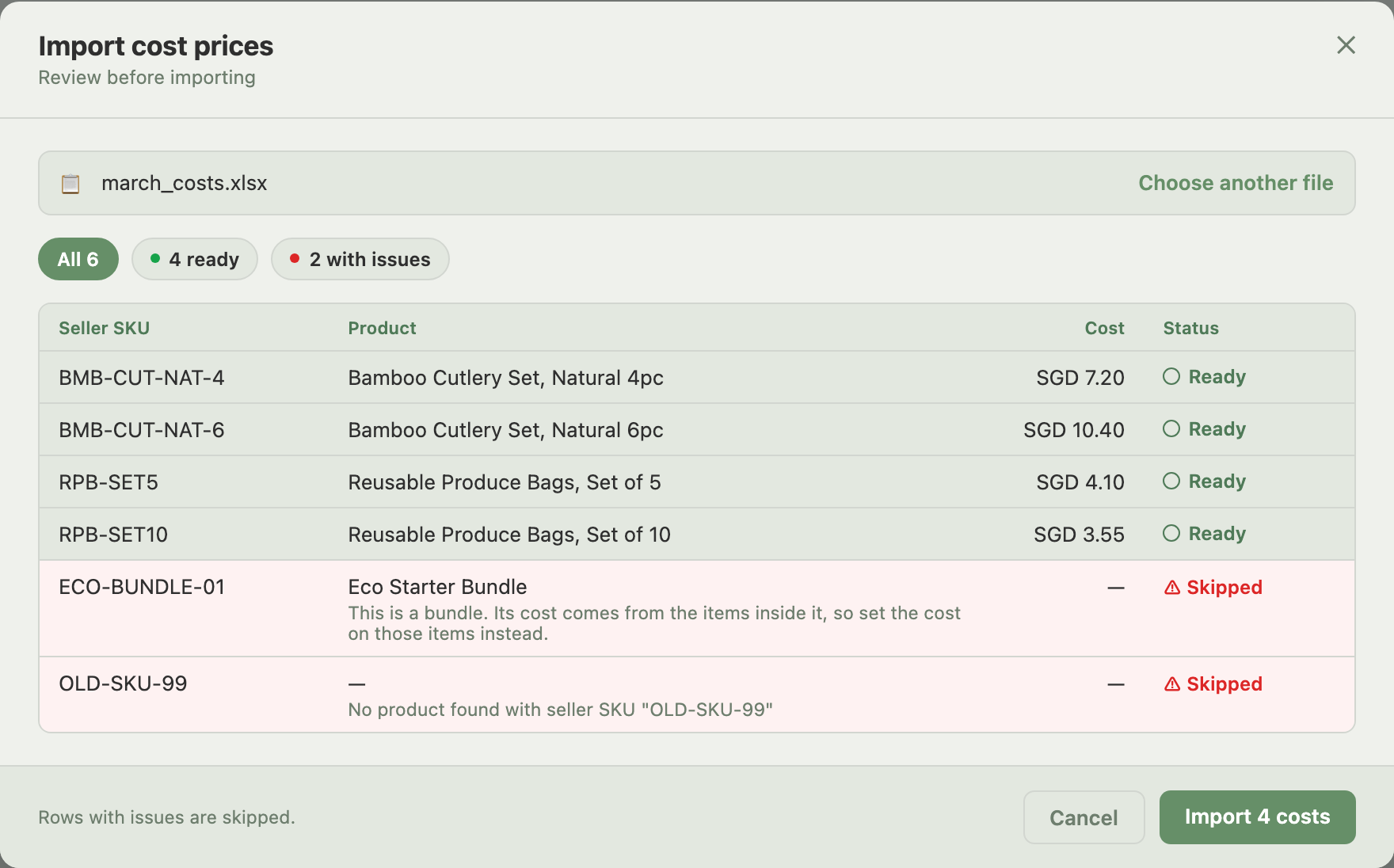
For a large catalog, importing a spreadsheet is usually faster. From the Products page, open Bulk Actions and choose Import Costs (Excel/CSV). A window titled Import cost prices opens.
- Two columns: Seller SKU and Cost Price. There is no currency column: every cost is in your main currency, set in Account (open your profile menu at the top right and choose Account).
- Review first. Indexync shows a review table marking each row ready or flagged, and nothing is saved until you click Import.
- Rounding. Values round to 2 decimal places, so a stray third decimal is rounded rather than rejected.
Rows with an issue are skipped and everything else goes through:
- A bundle parent SKU is refused, with a message to set the cost on the items inside it.
- A SKU that doesn't match any product is refused, as is a SKU that matches more than one product (give each one its own SKU first).
- A blank Seller SKU or blank Cost Price cell is skipped.
Cost price and your Shopify store
Cost price is never shown to buyers on any channel. If a product is listed on Shopify, Indexync writes the cost into that product's Cost per item field in your Shopify admin whenever it syncs, so both figures stay the same. Shopify treats that field as private to you too. Shopee, Lazada and TikTok have no equivalent field, so nothing is sent to them.
Where cost prices show up afterward
Once a SKU has a cost price and has sold since then, you'll see it in:
- The Profit and Loss statement and GMV Split card on the Financials page. COGS fills in, and Net Profit stops reading "Before cost of goods" once every order in view has a cost. While only some do, an asterisk marks COGS and Net Profit.
- The Product Performance table's COGS, Net Profit and Profit Margin columns.
- The Product Analysis tab's Payout & Fees KPI cards for that product.
Troubleshooting
Financials still says "Before cost of goods" or shows an asterisk, or Product Performance still shows a dash, after you set a cost price. Check whether the orders in your date range were placed before you set the cost:
- If they were, the gap is correct and permanent for those orders (the forward-only rule).
- If they were placed after, refresh the page. If it's still blank, re-check the SKU has a saved cost in the Product Modal.
A row in your cost import file was skipped. The review table shows the reason for each skipped row:
- Bundle parent SKU: set the cost on the bundle's component items instead.
- SKU not found, or matches more than one product: give the SKU a unique match first, then re-import.
- Blank Seller SKU or blank Cost Price: fill in the missing cell and re-import just that row.
FAQ
Why does my Financials page still show "Before cost of goods" or an asterisk about missing costs after I set a cost price?
Costs are forward-only. An order placed before you set the cost never gets one, even after you set it. Check your date range: if it covers orders from before you added the cost, the note is expected, not a bug. On Payout date, an order placed before you set the cost still counts if it was paid out in your range.
Can I set a different cost price per marketplace for the same SKU?
No. Cost price lives on the Master Product tab and applies to every marketplace listing for that SKU. There's no per-channel override.
Does Indexync send my cost price to Shopee, Lazada or TikTok?
No. Shopee, Lazada and TikTok have no cost field, so nothing is sent to them. Shopify is the one exception: Indexync writes your cost into Shopify's Cost per item field, which stays private to you there too.
What happens if I import a spreadsheet with a bundle parent's SKU in it?
That row is skipped. The review table flags it with a message telling you to set the cost on the bundle's component items instead, since a bundle's cost is calculated from what's inside it.
Can I go back and add costs to old orders?
No. Cost prices apply only to orders placed after you set them. Indexync does not re-cost orders that already happened.
Related Articles
- Analytics Overview
- Your Financials Page
- Understanding Revenue and Seller Payout
- Product Performance Tab
- Product Analysis Tab
- Managing Your Account
Need More Help?
Visit our Feedback page, WhatsApp us, or email hello@indexync.com with your account details and any questions about setting cost prices.