What Is a Promotion in Indexync?
A promotion in Indexync is a scheduled price discount you apply to one or more products, on one or more of your connected stores, from a single place. You set the discount type, pick the products and stores, choose a start and end date, and Indexync submits the discount to each store and tracks it through its lifecycle automatically.
Applies to: Pro and Scale plans.
Before you start
- Promotions are included on Pro and Scale. Free and Lite sellers can't create or edit a promotion.
- If you're on Free or Lite, including after a downgrade, you can still delete a draft or scheduled promotion, or end a running one early. Only creating and editing are blocked, so a live promotion is never stuck on your account.
- At least one store must be connected. See Connecting Marketplaces if you haven't yet.

What is a promotion?
A promotion covers per-SKU price discounts only. You create it once, choose which stores and products it applies to, and publish it. Indexync submits the discount to each selected store and removes it automatically once the promotion ends, whether that's the scheduled end date or because you ended it early.
Discount stacking, coupon codes, and shipping promotions aren't part of this feature.
Discount types
Every promotion uses one of two discount types for its whole duration. Each product (SKU) in the promotion uses that same type but can carry its own discount value.
- Percentage Off: set a percentage to deduct from the original price. The marketplace calculates and displays the discounted price.
- Fixed Amount Off: set a currency amount to subtract from the original price.
Example: same products, two discount types compared. You run a Percentage Off promotion at 15% across three products priced at $20, $30, and $50. Customers see $17, $25.50, and $42.50 on the marketplace. If you switch to Fixed Amount Off at $5 instead, customers see $15, $25, and $45. The dollar reduction is the same on each product regardless of its original price.
You can change the discount type any time before the promotion starts, including on a store already synced to TikTok Shop. Indexync handles the swap for you, and because you can only edit a promotion before it starts, nothing your customers see is interrupted. The Discount Type buttons are frozen only while a save or sync for that promotion is still running.
Store selection, not channel selection
Promotions target individual stores, not marketplaces as a whole. When you open the Create Promotion window, every connected store gets its own card, named by the nickname you gave it in Settings with its region shown as a small pill beside the name. If you sell on two Shopee shops, you'll see two Shopee cards and can pick either one, both, or neither.

This matters because your catalogue is rarely identical across stores. A product listed on your Malaysia shop but not your Singapore shop can be discounted on one without touching the other. Two things happen automatically:
- A store with no eligible products can't be picked. Its card is greyed out and reads "No products available".
- A selected store that ends up with none of your chosen products is skipped, not blocked. A line appears under the store grid: "N stores skipped: no eligible products." with the store names. The promotion still saves and goes live on the stores that do have products. The one exception is when every selected store is empty, in which case Indexync asks you to add products first instead.
Example: you run two Shopee shops (SG and MY) and one TikTok Shop. You select all three, then add five products that are only listed on Shopee SG and TikTok. Under the store grid you see "1 store skipped: no eligible products." with your MY shop named. You save anyway, and the promotion goes live on Shopee SG and TikTok.
The promotion lifecycle
A promotion moves through these statuses automatically. You don't need to manually advance it between stages.
Example: you create a "Lunar New Year 20% Off" promotion on January 28 with a start date of February 1 and an end date of February 7. After publishing, it shows as Scheduled. At midnight on February 1 it auto-progresses to Ongoing and your customers start seeing the discount. On February 8 it auto-progresses to Expired.
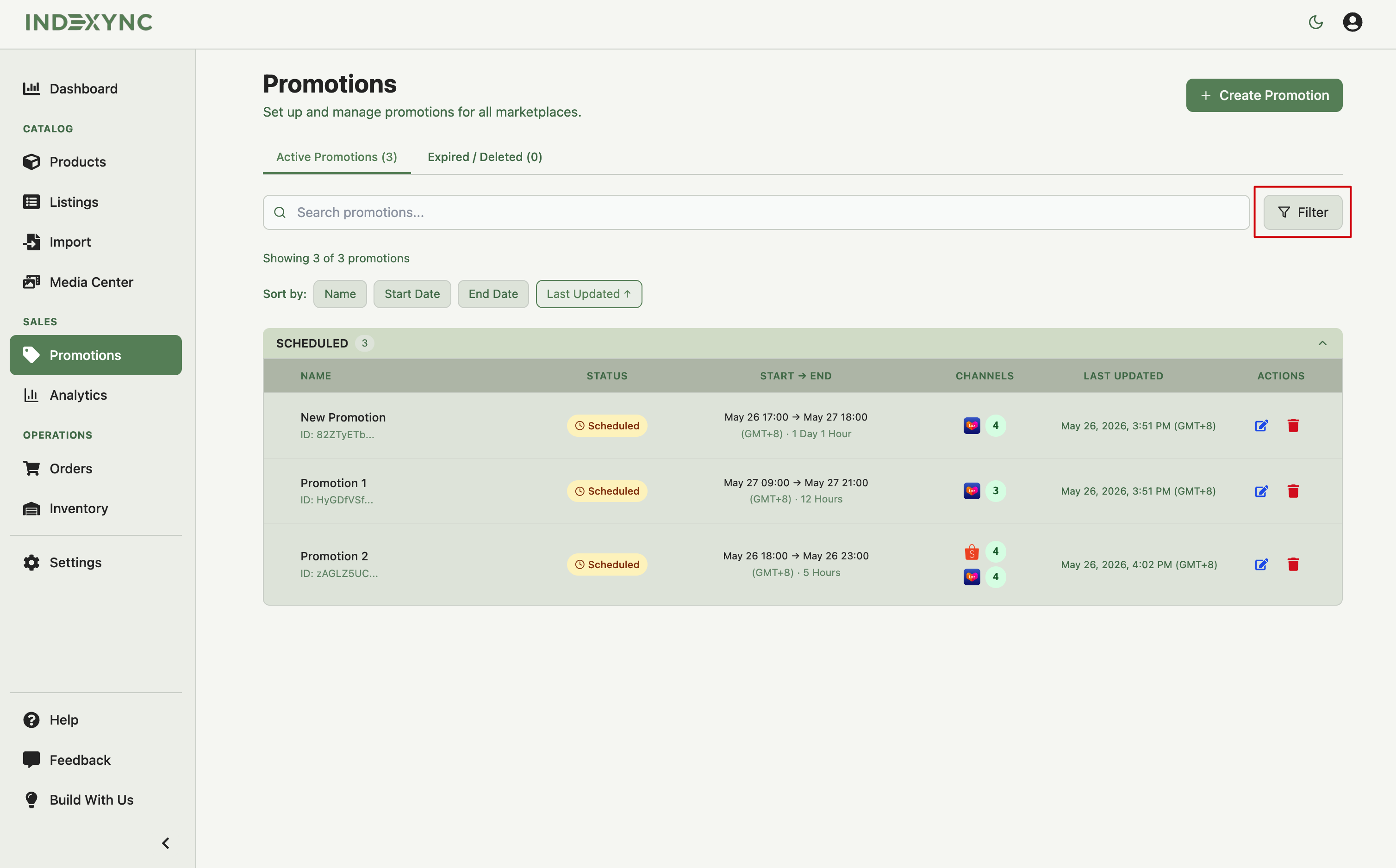
Ending a promotion early. You can end any Ongoing promotion before its scheduled end date. The status moves to Expired and the discounted prices are removed from your marketplace listings within a few minutes.
Supported marketplaces
All four marketplaces Indexync connects to support promotions, and each connected store can be targeted individually.
Every promotion also has to start at least 1 hour from now and end within 30 days from today.
The marketplace renders the discount using its own native promotion display. On Shopee, Lazada, and TikTok Shop, customers typically see the original price crossed out next to the discounted price. On Shopify, they see the discounted price with a sale indicator.
If you can't change a price
If you're trying to change a product's price on the Products page and it won't save, check whether that SKU is in an active promotion here first. See Editing & Updating Products & Listings for how the price lock works and what to do about it.
FAQ
Which plans include Promotions?
Pro and Scale. Free and Lite sellers can view, delete, or end early any promotion they already have, but can't create or edit one.
Can I mix Percentage Off and Fixed Amount Off in the same promotion?
No. A promotion uses one discount type for its whole duration. You can change the type before it starts, but this clears any discount values you've already entered.
Does a promotion target a marketplace or a specific store?
A specific store. If you have two Shopee shops, each gets its own card in the Store Selection grid, and you choose independently which ones run the promotion.
What happens to a store I selected but never added products to?
Indexync skips it and tells you: "N stores skipped: no eligible products." The promotion still goes live on the stores that do have eligible products.
Is TikTok Shop supported the same way as the others?
Yes. TikTok Shop supports promotions like every other connected marketplace, including its own SKU cap.
Related Articles
- How Do I Create a Promotion in Indexync?
- How Do I Edit, End, or Delete a Promotion?
- Why Does Indexync Say My Promotion Conflicts?
- Connecting Marketplaces
Need More Help?
Visit our Feedback page, WhatsApp us, or email hello@indexync.com.