How Do I Ship and Fulfil Shopee Orders?
Open the order, click Arrange Shipment, pick a shipping method, then Generate Shipping Label once Shopee has assigned a tracking number. Indexync schedules the logistics handover with Shopee and keeps the order's status in sync.
Applies to: All plans with a connected Shopee store.
Finding your Shopee orders
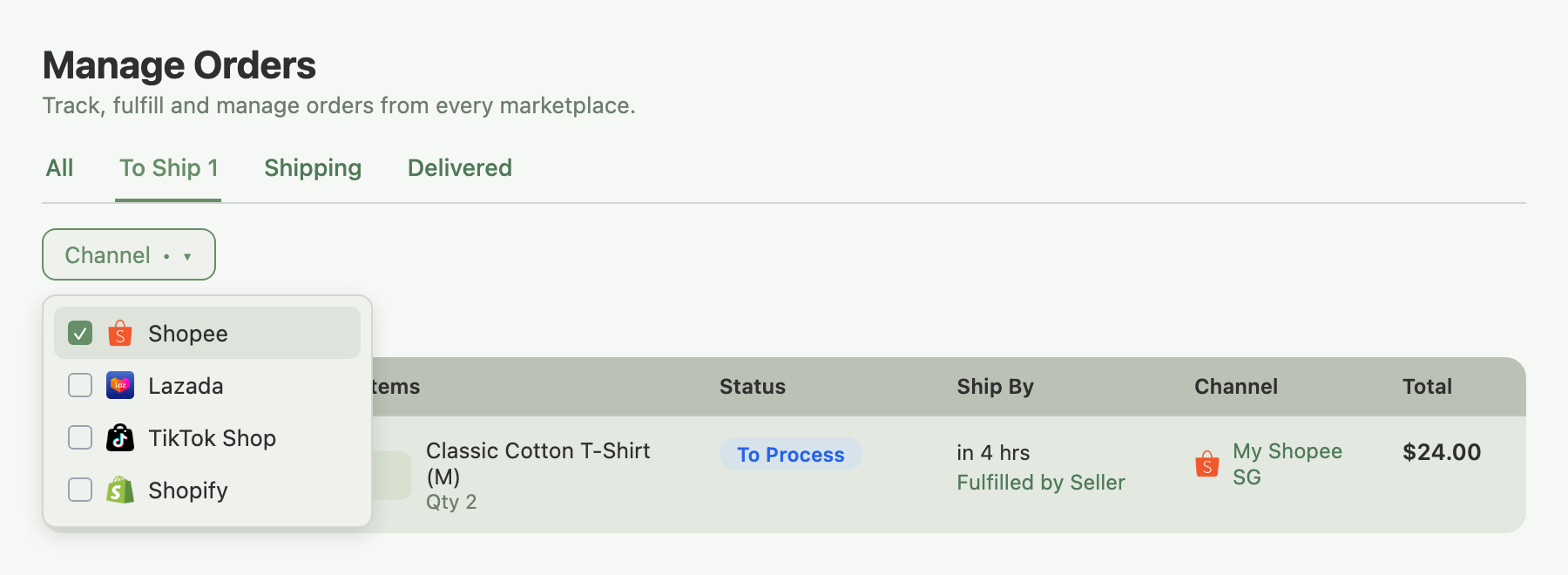
Open Orders in the left sidebar to reach the Manage Orders page.
- Click the Channel filter in the toolbar.
- Select Shopee.
The list narrows to Shopee orders only. Switch to the To Ship tab to see orders ready for fulfilment. Shopee orders, including COD orders, show as To Process; Shopee doesn't have a separate "paid" status in Indexync's status list, so fulfil a COD order the same way as any other.
Arrange Shipment and the three shipping methods
When a Shopee order is ready to ship, its Actions menu shows Arrange Shipment. Open the order and click it to see the shipping methods Shopee offers for that order's logistics provider:
- Pickup: Shopee's courier collects from your registered address. Select the address and, if asked, a pickup time slot.
- Drop-off: you bring the package to a designated logistics branch. Select the branch from the list.
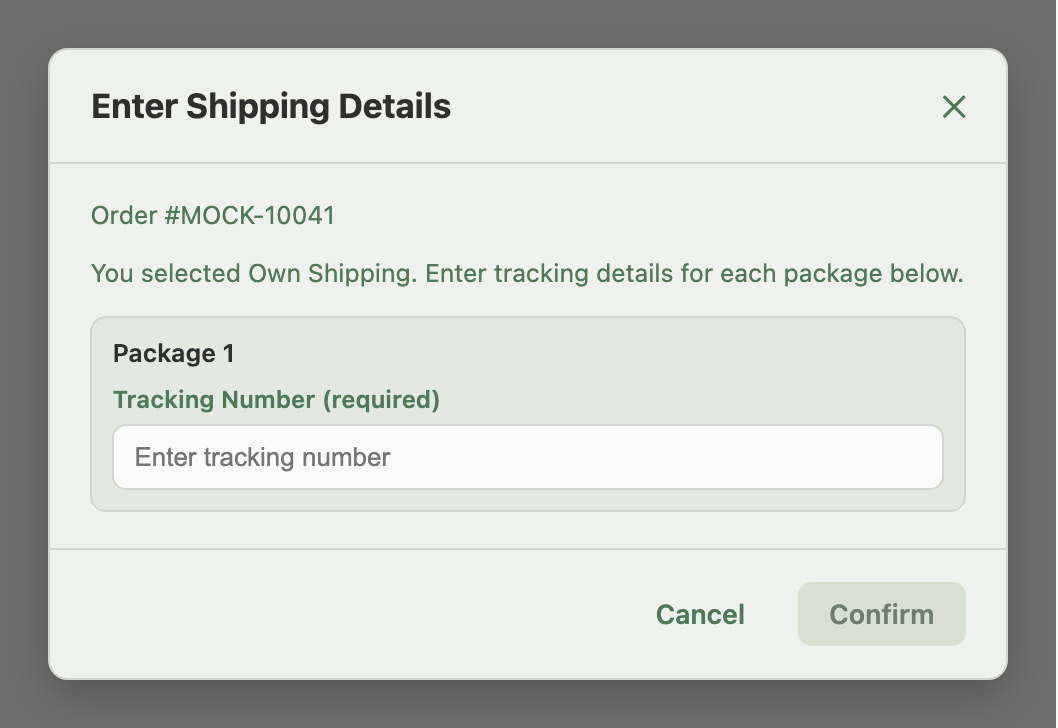
- Manual ("I will handle shipping manually"): you use your own courier. Selecting it opens a second window, Enter Shipping Details, with a Tracking Number field for each package in the order. Confirm stays disabled until every package has one filled in. After shipping, the Order Details page displays this method as Own Shipping.
Select a method, confirm any required details, and submit. Shopee schedules the handover and assigns a tracking number to the order.
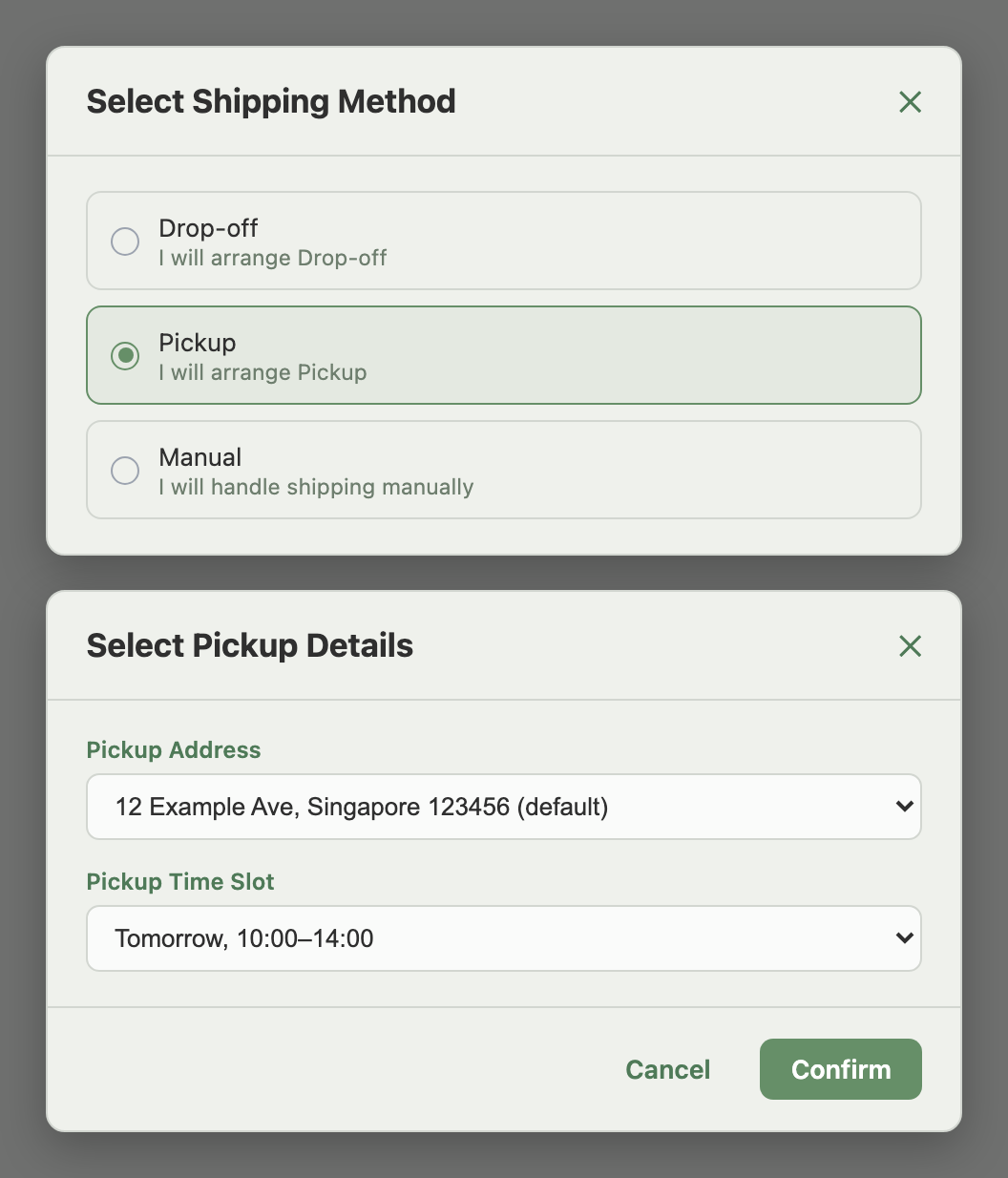
Example: a Pickup order. Open it, click Arrange Shipment, choose Pickup, select your pickup address and confirm. Shopee schedules the pickup and assigns a tracking number. About a minute later, click Generate Shipping Label to download the airway bill and attach it to the parcel.
Example: you ship with your own courier. Open the order, click Arrange Shipment, choose Manual, confirm. The Enter Shipping Details window opens with one package listed; type in the tracking number your courier gave you and confirm. Hand the parcel to that courier with the tracking number attached.
Generating and printing the shipping label
After Arrange Shipment completes, click Generate Shipping Label on the order to download the airway bill.
If Shopee hasn't yet assigned a tracking number, which is common right after Arrange Shipment, Indexync keeps checking for about a minute. If a tracking number lands during that window, the label downloads automatically. If not, you'll see: "Shopee is still preparing the tracking number. Please try again in about a minute." Wait a moment and try again. Once a label has been generated, the same button changes to View Shipping Label, so you can reopen the PDF at any time without regenerating it.
When tracking fails permanently
Occasionally a Shopee order's tracking fails for good. Shopee returns an error such as "package not ready to ship" or "invalid package" that retrying won't resolve. When that happens, Indexync shows: "Shopee could not generate tracking for this order. Please verify the order is valid and contact support if this persists."
Retrying in Indexync won't help here. Open your Shopee Seller Portal directly to investigate the order, or contact Shopee support to resolve the underlying issue with the package or logistics assignment.
Cancelling an order
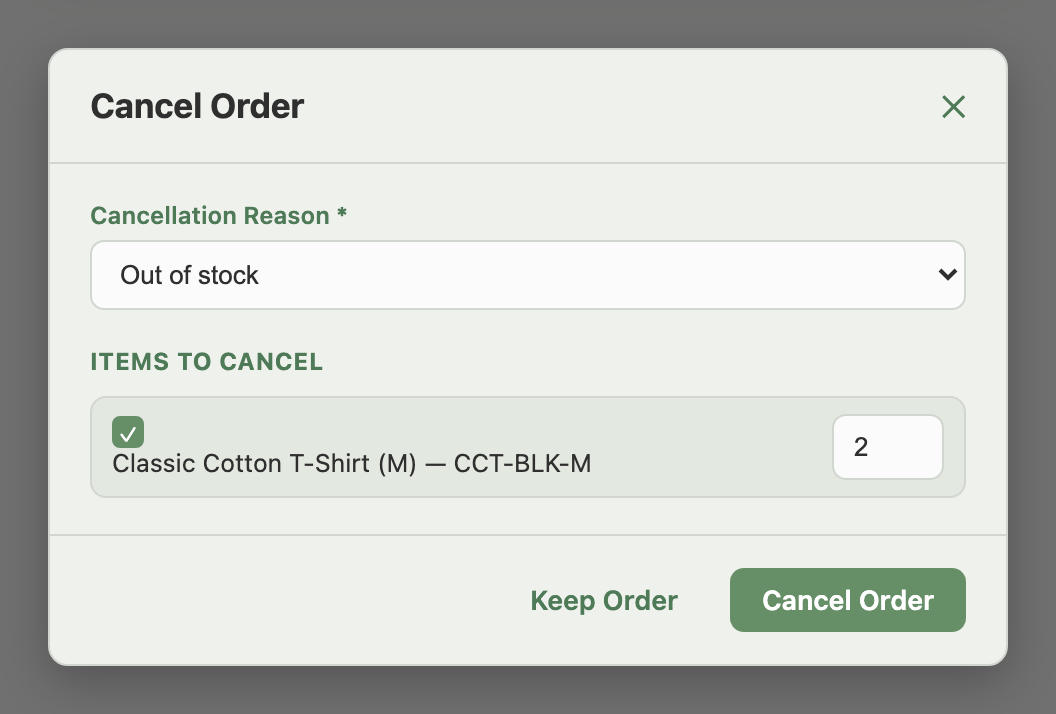
The Cancel Order action appears on Shopee orders that are still cancellable. It opens a window where you:
- Select a Cancellation Reason. The available reasons depend on your Shopee region.
- Select the order items you're cancelling, with quantities.
Click Cancel Order to submit. Indexync sends the cancellation to Shopee and updates the order.
Shipping document settings
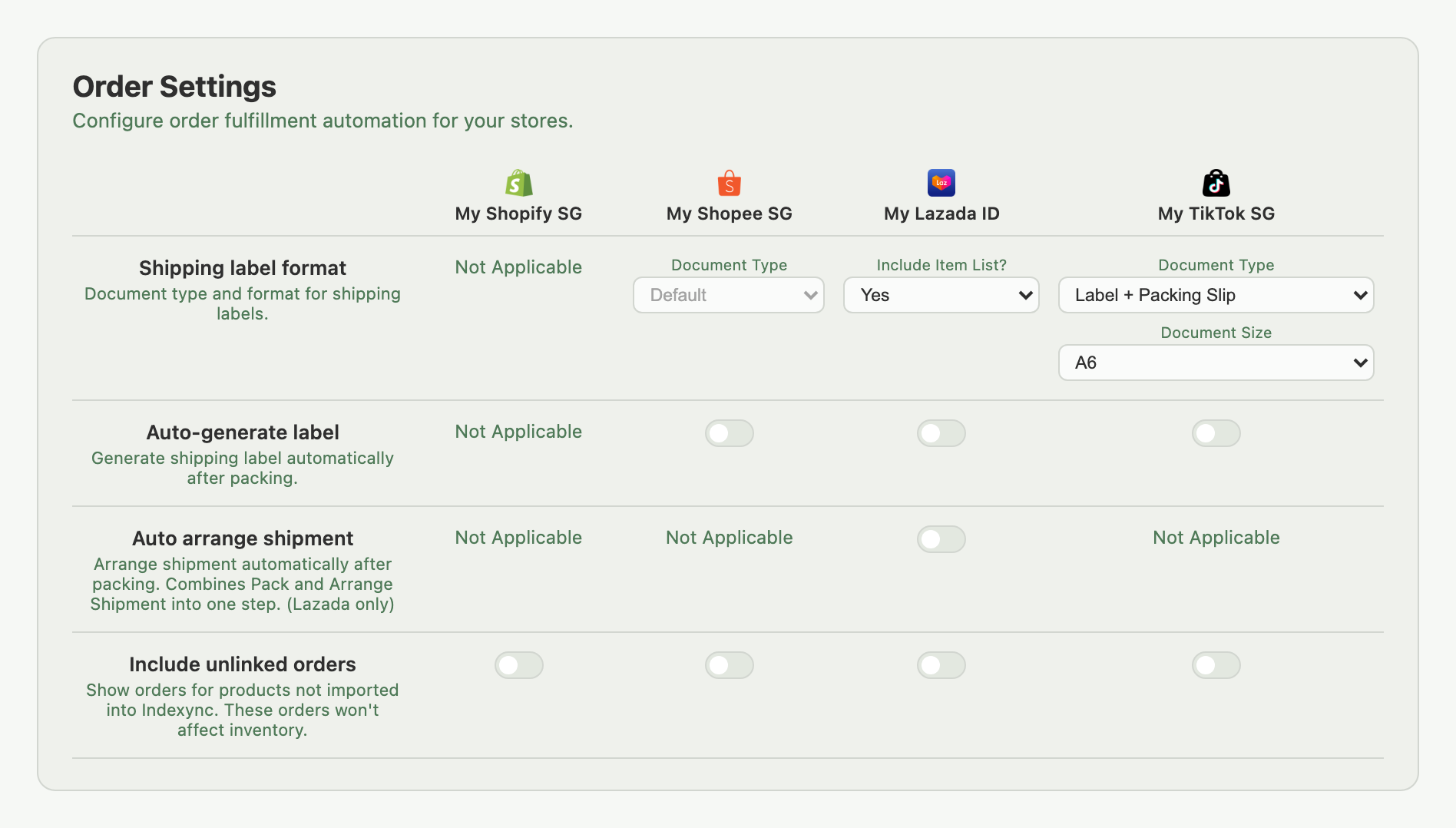
Under Settings → Orders, the Shopee column shows Document Type locked to Default, which lets Shopee determine the correct airway bill format based on the order's logistics provider. No configuration is needed there.
Save a click on every order: the same grid has an Auto-generate label toggle for your Shopee store (off by default). Turn it on and Indexync requests the shipping label automatically once an order is packed; no separate Generate Shipping Label click, ever, for that store.
Troubleshooting
Arrange Shipment isn't showing. The order may already be shipped, or it's in a status that doesn't allow fulfilment yet. Check the order in your Shopee Seller Portal. If your Shopee connection has lapsed, reconnect it under Connections (in the sidebar).
Label download fails after Arrange Shipment. Wait about a minute, then click Generate Shipping Label again. If the error persists after several retries, confirm in your Shopee Seller Portal that the shipment was arranged successfully.
"Shopee could not generate tracking for this order." This is a permanent tracking failure. Retrying in Indexync won't resolve it; investigate the order in your Shopee Seller Portal or contact Shopee support.
Cancel Order isn't showing. Cancellation is only available while the order is in a cancellable status. Once an order is shipped or past the cancellation window, cancel it from your Shopee Seller Portal instead.
FAQ
How do I fulfil a COD (cash on delivery) order?
Every Shopee order, including COD, shows as To Process once it's ready to pack. Fulfil it the same way as any other order.
What's the difference between Pickup, Drop-off, and Manual?
Pickup has Shopee's courier collect from your address; Drop-off means you bring the parcel to a logistics branch; Manual uses your own courier, with tracking entered by you in the Enter Shipping Details window.
Why does my shipping label take a minute to download?
Right after Arrange Shipment, Shopee sometimes hasn't assigned a tracking number yet. Indexync keeps checking for about a minute; if it's still not ready, wait and click Generate Shipping Label again.
What does "Shopee could not generate tracking for this order" mean?
A permanent tracking failure on Shopee's side. Retrying won't fix it; check the order in your Shopee Seller Portal or contact Shopee support.
Can I cancel a Shopee order after it's shipped?
No. Cancel Order only appears while the order is still cancellable. Once it's shipped, manage cancellations from your Shopee Seller Portal.
Related Articles
- Where Do All My Marketplace Orders Show Up?
- Processing Shopify Orders
- Processing Lazada Orders
- Processing TikTok Shop Orders
- Bulk Operations & Pick Lists
- Handling Returns & Cancellations
- Troubleshooting Order Issues
Need More Help?
Fill out our Feedback form, message us on WhatsApp, or email us at hello@indexync.com.