How Do I Add Extra Stores Without Upgrading My Plan?
You can add extra stores to your current plan, so you do not have to upgrade just to connect one more store. Each extra store adds one store to your limit for SGD 10 a month on the LITE, PRO and SCALE plans. Take a seller on PRO (SGD 39 a month, 6 stores) with 8 stores: two extra stores bring the bill to SGD 59 a month, against SGD 99 for SCALE.
Applies to: Available on LITE, PRO and SCALE, with card billing or Shopify billing. Only the workspace owner can buy or change extra stores. They are not available on FREE or during a free trial, where you choose them when you pick your plan (see below).
How Many Stores Does My Plan Include, and What Do Extra Stores Cost?
Each connected store counts toward your store limit, which is the stores your plan includes plus your extra stores. The table shows what each plan includes and your monthly bill with one extra store.
Example: Mei Ling sells on Shopee, Lazada and TikTok across 8 stores in total. PRO includes 6, so she needs 2 extra stores. PRO plus 2 extra stores is SGD 39 + SGD 20 = SGD 59 a month. SCALE would be SGD 99 a month.
How Do I Add Extra Stores?
- Open Billing from your profile menu.
- Find the Add-Ons section and click Add Extra Stores in the Extra Stores row. If you already hold some, the button reads Change.
- Use the counter to choose how many extra stores you want in total. The Store Limit tile shows how many stores you can connect with that number.
- Check Due Today, then click the confirm button, which reads Add 1 Extra Store or the number you chose.
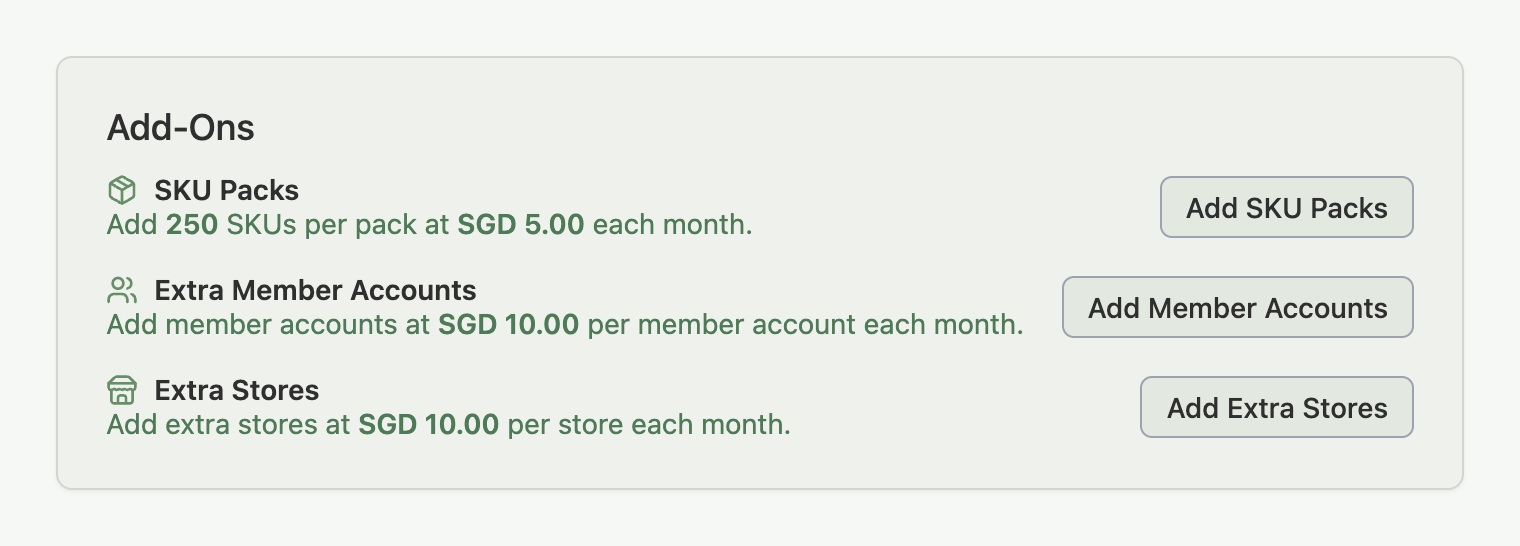
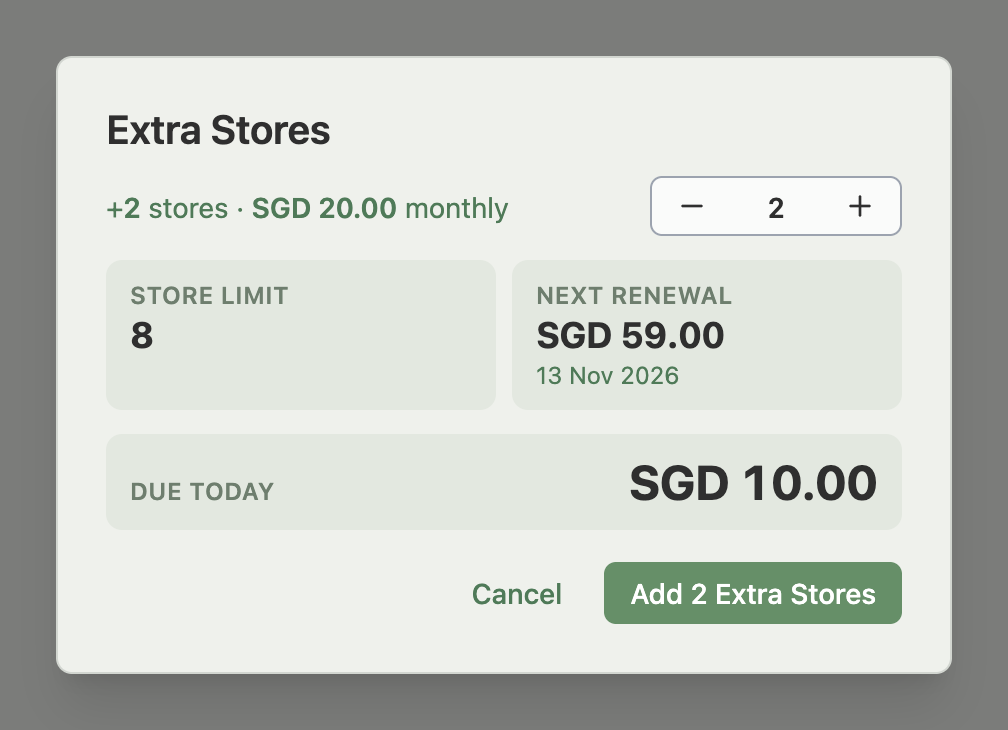
Your new store limit applies as soon as the payment goes through, and you can connect the store from the Connections section. Connecting Your Marketplaces covers the connecting itself. If store credit covers part of the charge, a line for it sits above Due Today, and the amount due is the part left for your card.
You can also start from the Connections section. When every store your limit allows is connected, an amber banner says so, and the workspace owner sees an Add Extra Stores link beside it that opens this same window with the counter set to one more than you hold. Team members and sellers on other plans see the banner without the link.

Example: Tom is on LITE with 3 stores connected and tries to connect a fourth. The Connections section says all 3 stores are in use. He clicks Add Extra Stores, the window opens with the counter at 1, Due Today shows the days left until his next charge, and after he confirms his store limit is 4.
What Do I Pay Today, and What Happens Every Month After?
You pay today only for the days left until your next extra store charge, and from then on you pay the full price every month. How the monthly charge reaches you depends on how you are billed.
Extra stores are billed on the same date as your plan. Understanding Your Billing Cycle explains the date. They appear on a new invoice or receipt as Extra Store × N, and a first charge for part of a month shows the number of days. Invoices and Receipts explains where to find them.
How Do I Remove Extra Stores?
Click Change in the Add-Ons section, lower the counter, and confirm. Removing them charges and refunds nothing now, and they stay until your current paid period ends, which the Next Renewal or Next Extra Store Charge tile shows. If you are billed through Shopify, a removal applies when your current Shopify billing period ends.
You cannot hold a store limit below the stores you have connected, so the counter stops at the fewest extra stores your connected stores need. When you click the minus button there, a line under the counter tells you how many stores are connected and asks you to disconnect stores before you lower it. After you disconnect, the counter goes lower.
A removal you have scheduled already counts. From the moment you confirm, new connections follow the lower store limit, while every store you have connected keeps syncing. The Add-Ons row shows the waiting change with a Cancel Change button. You can also cancel it from the window: open Change again, and while the counter sits at your current number, the button at the bottom reads Cancel Pending Change. Click it and your extra stores stay as they are.
Example: Priya holds 2 extra stores on PRO and has 7 stores connected. She lowers the counter to 1, which is as low as 7 stores allow. Nothing is charged or refunded now, and the extra store stays until her paid period ends. From the moment she confirms, she cannot connect an 8th store, and all 7 stores already connected keep syncing. If she changes her mind, Cancel Change on the row keeps both extra stores.
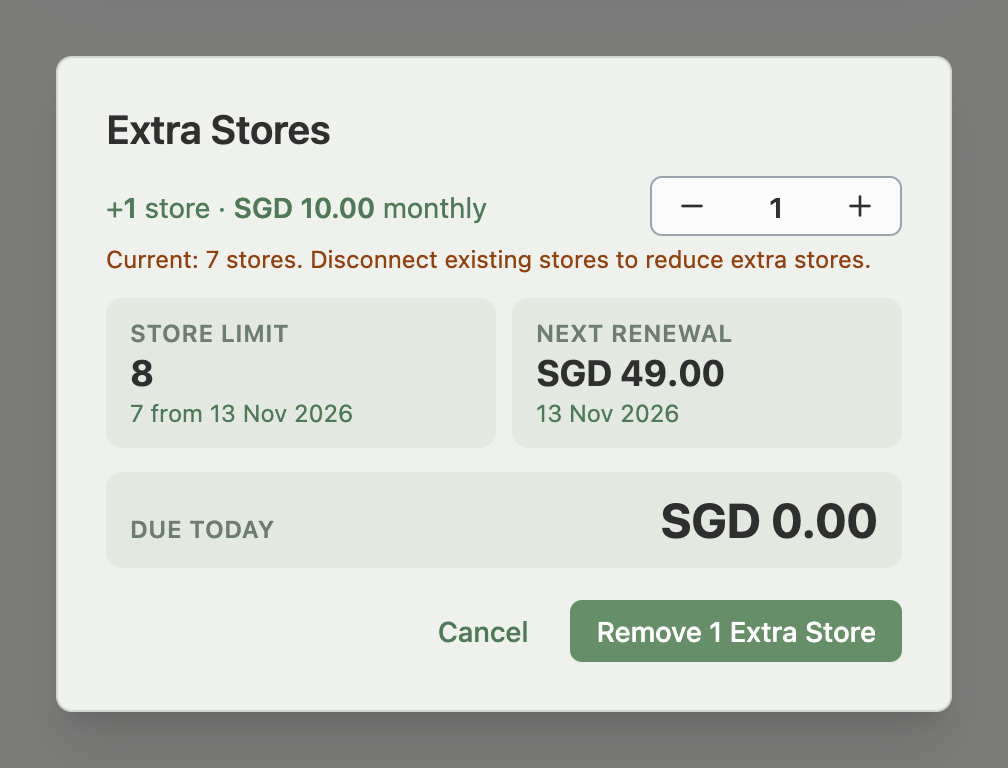
Example: Priya clicks the minus button again at 1 extra store and sees that 7 stores are connected and she needs to disconnect stores first. She disconnects one store, and the counter now goes down to 0.
Can I Add Extra Stores When I Choose or Change a Plan?
Yes. The trial checkout and the upgrade and downgrade screens show an Extra Store Add-On counter, with Your Stores and Store Limit tiles, when your connected stores need extra stores on that plan, you already hold some, or you set a number yourself. On an upgrade or a trial checkout it starts at the fewest extra stores that cover your connected stores; on a downgrade or billing cycle switch it starts at the extra stores you hold. You can raise it, and lower it only as far as your connected stores need.
- During a free trial: the trial checkout suggests the cheapest mix of plan and extra stores for the stores you have connected, and the extra stores you choose start with your paid plan. With 8 stores connected, that is PRO plus 2 extra stores at SGD 59 a month, not LITE plus 5 extra stores at SGD 69.
- Upgrade: on card billing, the screen credits the unused days of any extra stores you hold beyond the counter. See How to Upgrade Your Plan.
- Downgrade: the counter sets the extra stores your lower plan starts with, from the downgrade date. If the lower plan plus your extra stores would not cover your connected stores, the screen asks you to add extra stores or disconnect stores first. See How to Downgrade Your Plan.
- Moving to the FREE plan: your extra stores end when the move takes effect, and the plan screen never refuses the move. FREE includes 2 stores, so you cannot connect another one until you are under that number.
- Shopify billing: Shopify bills the extra stores you choose on the plan screen.
What Happens If an Extra Store Payment Fails?
When the card is declined, a red banner on the Dashboard and the Billing page says Indexync couldn't charge you for your extra stores. The sidebar shows an Extra Stores at Risk tile. Click Make Payment to pay with a working card, or Update Card to change the card first. If another add-on has also failed, one banner lists each with its own Make Payment. See Payment Methods and Troubleshooting.
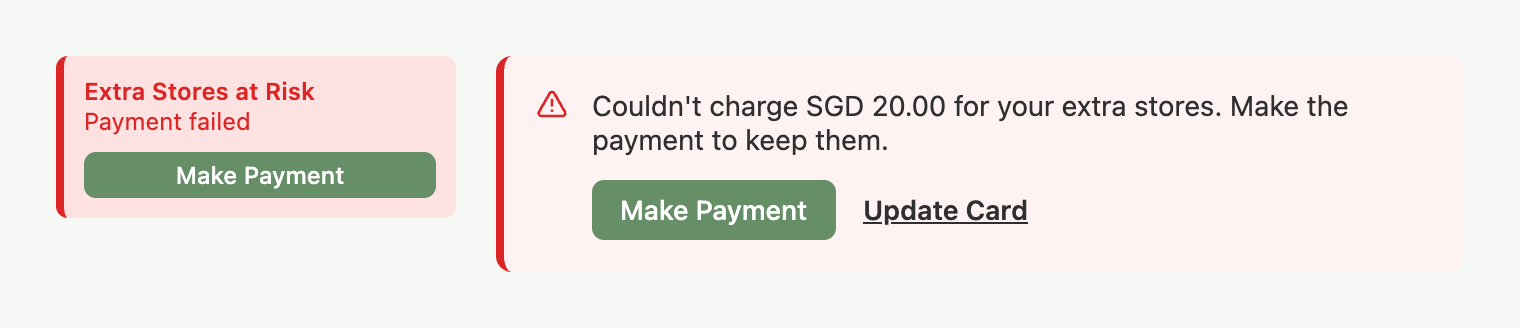
- While the charge is unpaid: you cannot add more until you pay.
- If it keeps failing: after repeated failed charges Indexync removes your extra stores, and a banner tells you. Your store limit returns to the one your plan includes. You can add extra stores again at any time. If you add them back in the same month, Due Today includes the days that were not paid.
Example: Priya's card is declined on her next charge for 2 extra stores. The banner shows SGD 20.00 owed, she clicks Make Payment, and the extra stores stay.
Troubleshooting
Most of these messages appear when you try to connect a store, in the Connections section. Find yours in the table, then go to its entry.
I Can't Connect Another Store
You see: "Couldn't connect another store." The message points you to Add Extra Stores on the Billing page. On the Connections section, an amber banner says all your stores are in use.
Why: you have connected every store your plan and extra stores allow.
- Click Add Extra Stores on the banner, or open Billing and click it in the Add-Ons section.
- Choose how many extra stores you want and confirm, then connect the store again.
You can also disconnect an existing store first to free up room.
I Can't Connect Another Store as a Team Member
You see: "Couldn't connect another store." The message says your account is at its store limit and tells you to ask the workspace owner.
Why: only the workspace owner buys extra stores, and your account has no room for another store.
- Ask the workspace owner to add extra stores, or to free up a store by disconnecting one.
- Connect the store again once they have done it.
I Can't Connect a Store After Scheduling a Change
You see: "Couldn't connect another store." The message says your extra stores drop on a date, with your own number and date, and points you to Cancel Change. If a plan downgrade is waiting instead, it says your plan changes on that date and points you to Cancel Plan Downgrade.
Why: a removal or downgrade you scheduled already counts, so the lower store limit applies to new connections before the date.
- Click Cancel Change on the Extra Stores row in the Add-Ons section, or Cancel Plan Downgrade if that is the change waiting.
- Connect the store again, or disconnect a store first if you want to keep the change.
I Can't Lower My Extra Stores
You see: "Disconnect existing stores." It shows under the counter, after "Current:" and your number of stores, when you click the minus button at the lowest number. If you confirm a lower number anyway, a message starting "Couldn't remove extra stores" tells you how many stores to disconnect first.
Why: you cannot hold a store limit below the stores you have connected.
- Disconnect the stores you no longer need.
- Open Change in the Add-Ons section and lower the counter again.
My Extra Store Payment Failed
You see: "Couldn't charge" your extra stores. The message names the amount and asks you to make the payment to keep them. The sidebar shows an Extra Stores at Risk tile.
Why: the card was declined.
- Click Make Payment, or click Update Card first if the card has changed.
- Check the banner and the sidebar tile are gone.
I Can't Find Add Extra Stores
Why: the Extra Stores row appears only for the workspace owner on LITE, PRO and SCALE, outside a free trial, and a team member cannot open Billing.
- Check that you are signed in as the workspace owner.
- Check your plan in Billing. On FREE, upgrade first. In a free trial, choose extra stores at checkout.
My Card Was Charged but My Extra Stores Did Not Arrive
You see: "Couldn't add your extra stores." The message tells you to contact support.
Why: the charge went through but the extra stores could not be added to your account.
- Contact support using the details at the end of this article.
- Support adds the extra stores or refunds the charge.
Another Extra Store Purchase Is in Progress
You see: "Couldn't add extra stores". The message says another extra store purchase is in progress and asks you to try again in a few minutes.
Why: another payment for your extra stores is still being processed.
- Wait a few minutes.
- Open the Extra Stores window and try again.
I Can't Change My Extra Stores While a Change Is Waiting
You see: "Couldn't change your extra stores". The message says your plan change or another add-on change is waiting, and to change your extra stores after it starts.
Why: with Shopify billing, a change to your extra stores waits until the plan, SKU packs or member accounts change that is waiting has started.
- Wait until the waiting change starts.
- Change your extra stores from the Add-Ons section.
FAQ
Can I remove extra stores I still need?
No. You can't remove extra stores below what your connected stores need, so the counter stops you before you'd go over your limit.
Can I add extra stores on the FREE plan or during my free trial?
No. They are available on LITE, PRO and SCALE. If you paid for a plan during your trial, you chose your extra stores at checkout and they start with the plan.
Can a team member add extra stores?
No. Only the workspace owner can. A team member who tries to connect a store at the limit is told to ask the workspace owner.
What happens to my extra stores if I move to the FREE plan?
They end when the move takes effect. You cannot connect another store until you have fewer than the 2 stores FREE includes.
Related Articles
- Connecting Your Marketplaces
- How Do I Get More SKUs Without Upgrading My Plan?
- How Do I Add Extra Member Accounts Without Upgrading My Plan?
- How to Upgrade Your Plan
- How to Downgrade Your Plan
- Understanding Your Billing Cycle
- Payment Methods and Troubleshooting
- Invoices and Receipts
- What Is Store Credit and How Does It Work?
Need More Help?
Visit our Feedback form, WhatsApp us, or email hello@indexync.com.